




When a FedEx shipment is lost or arrives damaged, filing a freight claim is the only way to recover your costs. The process is straightforward when done correctly, but missing details or incomplete documents can lead to delays or denials.
This guide walks through the essentials of how to file a FedEx freight claim.
Why Filing FedEx Freight Claims Matters
Every damaged or missing shipment represents a potential loss. Filing claims correctly helps companies recover the value of goods and maintain accurate financial records.
A clear, consistent claim process allows businesses to:
- Recover the full value of lost or damaged freight
- Reduce manual claim handling time
- Improve tracking and reporting
- Strengthen overall shipping and financial performance
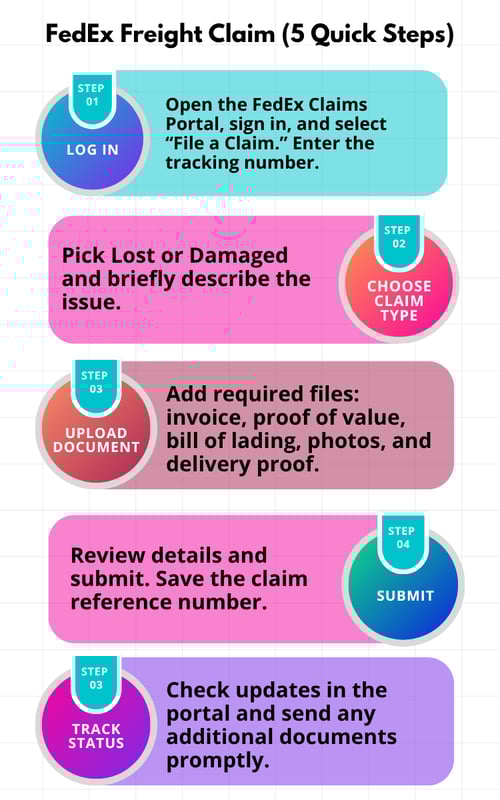
How to File a FedEx Freight Claim in 5 Steps
Step 1: Log in to the FedEx Claims Portal
Go to the FedEx Claims Portal and sign in using your FedEx account. Choose “File a Claim” from the menu and enter the tracking number and shipment details for the lost or damaged package.
Step 2: Identify the Claim Type
Select the type of claim you are filing. FedEx accepts claims for lost shipments and damaged shipments. Provide a brief description of what happened, including shipment contents and any visible damage.
Step 3: Attach Supporting Documents
Upload all required documents to validate your claim. These may include the commercial invoice, proof of value, bill of lading, photos of damaged items, and proof of delivery or non-delivery.
Step 4: Review and Submit the Claim
Carefully review all claim details before submitting. Once submitted, FedEx will issue a claim reference number. This number allows you to track your claim status through the FedEx portal.
Step 5: Track Claim Status and Respond to Requests
Check the FedEx portal regularly for updates. Claims may take several days to review. FedEx may request additional documents or photos, so respond quickly to avoid delays.
Common Challenges with Manual Freight Claims
Manual claim management comes with predictable headaches:
- Searching through multiple programs to locate data and upload proof
- Tracking down invoices and photos from different departments
- Re-entering shipment details into carrier portals
- Managing follow-ups when carriers request additional documentation
These repetitive tasks consume hours each week and increase the risk of missed claims or late submissions.
Automating the FedEx Claim Process with iNymbus
Manually filing freight claims is repetitive and time-consuming. iNymbus automates the entire FedEx freight claim process using robotic process automation (RPA).
Automation bots:
- Read FedEx claim emails and extract key data
- Apply company rules based on claim type and amount
- Upload invoices and proof automatically
- File disputes directly in the FedEx portal
- Track claim progress and generate detailed reports
When FedEx updates its portal or login process, iNymbus adapts instantly, ensuring claim submissions continue without interruption.
With iNymbus, companies save hours of manual work, eliminate overtime, and ensure every claim is filed quickly and accurately.
Take the Next Step
Filing freight claims doesn’t need to be time-consuming or stressful. iNymbus helps distributors, manufacturers, and logistics teams automate the entire process for FedEx, UPS, and other carriers.

.webp)