

Kroger has completed its shift to Supplier Connect, its updated supplier correspondence and dispute platform. Supplier Connect now replaces Lavante as the primary system for managing deduction disputes, viewing remittance details, and communicating with Kroger teams. All historical Lavante data has been moved into the new platform for continued access.
Supplier Connect was built using supplier feedback and testing. Kroger states that the platform is designed to deliver better usability, fewer clicks, and more timely communication. For suppliers navigating Kroger's deduction process, this represents an important operational update.
Key Enhancements in Supplier Connect
Kroger highlights several improvements suppliers will see in the new system. These include:
- A refreshed and modern interface with simplified navigation
- Faster access to remittance details with fewer steps
- Increased self-service options and more immediate responses
- Clearer pathways for deduction disputes and past due balance inquiries
These enhancements aim to reduce time spent locating documents, tracking open issues, and managing back-and-forth communication.
Access Requirements Through Partner Pass
Supplier Connect is accessed through Partner Pass, Kroger's single sign-on portal that uses the Okta Verify mobile app for identity verification. Access varies by supplier organization and may require administrative setup.
Access scenarios explained:
If your company has never requested Supplier Connect access:
Email krogercorrespondence@prgx.com with your corporate TIN and a recently paid invoice or W-9.
If you previously accessed Lavante through Partner Pass:
Log into Partner Pass and select Open Supplier Connect.
If you used Partner Pass for other Kroger applications but not Lavante:
Your Supplier Connect admin can grant access.
If you have never used Partner Pass:
Your admin must add you. You will then receive a "Welcome to Partner Pass" email with instructions to install Okta Verify.
Kroger provides extensive support contacts for login issues, technical questions, dispute help, or Okta-related exceptions.
Source: Kroger transition notice
Source: Supplier Connect User Setup Guide
What This Change Means for Suppliers
The switch to Supplier Connect affects several areas of supplier operations, especially for teams handling deductions or high volumes of remittance activity.
Impacts suppliers should expect:
- New navigation and workflow patterns compared to Lavante
- Updated processes for reviewing open deductions, payment details, and historical data
- Dependence on Partner Pass and Okta Verify for all user authentication
- More structured pathways for submitting and tracking disputes
- A stronger emphasis on self-service and system-driven communication
While Supplier Connect is designed to streamline supplier interactions, it requires operational adjustments and consistent document readiness.
How to Dispute Claims in Supplier Connect Kroger
Kroger’s new platform introduces a more structured process for submitting and supporting dispute claims. Below is a concise overview of the workflow suppliers follow within Supplier Connect.
Steps to File a Dispute
- Log in to Partner Pass at https://partnerpass.krogerapps.com and complete Okta Verify authentication.
- From the dashboard, select Open Supplier Connect and open the main menu.
- Navigate to Transactions and search for the invoice tied to the deduction. Deduction invoices include “-CM”.
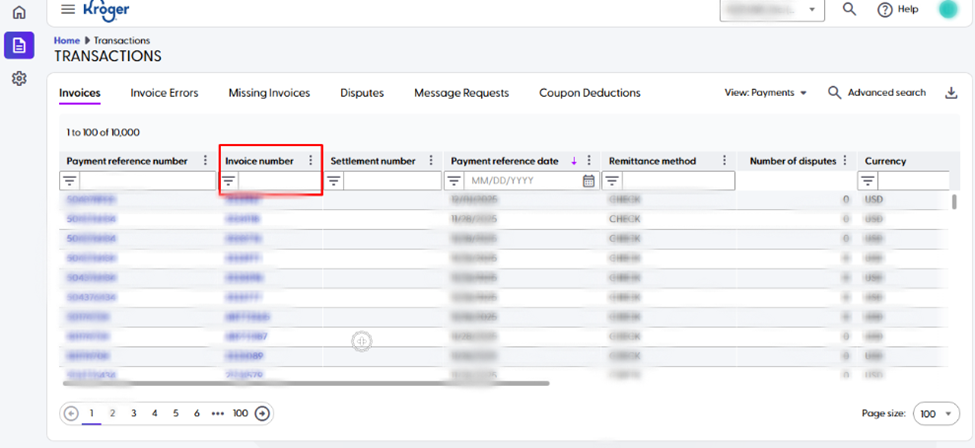
- Select the invoice and choose Add Dispute.
- Enter the dispute details and attach supporting documents.
- Submit the dispute for review.
How iNymbus Helps Suppliers Adapt to Supplier Connect
As suppliers transition to the new platform, many still face the challenge of managing high deduction volumes and assembling supporting documents for disputes. iNymbus automates these repetitive tasks to reduce manual workload and accelerate dispute handling.
iNymbus automation supports suppliers by:
- Automatically retrieving, organizing, and storing remittance documents
- Pulling and attaching required proof documents for dispute submissions
- Tracking dispute statuses and deadlines inside Supplier Connect
- Eliminating manual portal navigation for repetitive tasks
- Ensuring consistent and timely responses to Kroger deductions
Schedule a call with our team to learn how iNymbus can help you adapt to Supplier Connect and automate your dispute resolution process.
.webp)