
Kroger deductions are payment reductions applied through the Lavante portal (run by PRGX on Kroger's behalf) for issues including shortages, pricing errors, EDI failures, promotional disputes, ORAD violations, and shipping problems. Suppliers have 180 days to dispute invalid deductions, and once a dispute is filed, no changes are allowed.
This guide breaks down the most common Kroger deduction codes, how to decode Kroger's confusing invoice prefixes, what can and cannot be disputed through Lavante, and how to recover revenue at scale.
What Are Kroger Deductions?
Kroger deductions are payment reductions applied to supplier invoices when Kroger identifies a discrepancy, compliance failure, or contractual adjustment. Each deduction carries a code that identifies the reason, ranging from short shipments and pricing mismatches to ORAD compliance fines and promotional allowance errors.
The deductions are managed through Lavante, a third-party platform operated by PRGX on Kroger's behalf. Lavante is where suppliers review payments, identify deductions, and submit disputes. Kroger is currently transitioning Lavante to a newer platform called Supplier Connect by PRGX, though the dispute process remains structurally similar.
Suppliers have 180 days from the deduction date to file a dispute. Once a dispute is filed, no changes are allowed, which is why accurate documentation before submission is critical.
Kroger operates more than 2,700 stores across 35 states under banners including Kroger, Ralphs, Fred Meyer, King Soopers, Smith's, Fry's, Harris Teeter, and Pick 'n Save. Deductions can originate from any of these banners and from Kroger's manufacturing, warehouse, and Peyton distribution networks.
How Kroger's Deduction Code System Works
Kroger displays deduction codes directly on supplier invoices. Each code maps to a category that explains the underlying issue. Understanding the structure makes disputes faster and more likely to succeed.
Three things shape how Kroger deductions flow:
-
PRGX runs Lavante. When a supplier disputes a Kroger deduction, the case is reviewed by PRGX, not by a Kroger buyer. This matters because the dispute argument must satisfy PRGX's documentation standards, not just internal Kroger logic
-
Deductions are tied to specific supplier invoices. Every deduction references the original invoice it reduced. Payment numbers ending in "CM" identify payments with deductions applied
-
Once filed, no changes allowed. Every dispute must be complete and accurate before submission. There is no edit window after filing
For a broader context on how deductions fit into the retailer payment lifecycle, see the deduction management guide.
The Most Common Kroger Deduction Codes
Kroger uses a numbered code system to categorize deductions. The most common code categories cover promotions, shortages, EDI failures, and pricing differences.
Code 2: Promotional Allowance Difference
Codes in this category: OI (Off Invoice), NA (New Store Allowance), KSD/KSI/KSP/KSR (KATS Promotional Errors), PC/PSD/PSI/PSP/PSR (Scan or Coupon Errors)
What it means: A mismatch between the promotional terms the supplier agreed to and Kroger's records. Common triggers include incorrect promotional rates, item setup errors, invalid promotion dates, or performance that does not meet expected criteria.
Example cases:
-
DEAL123456-2024-04-01: Promotion rate input incorrectly in Kroger's system, triggering a deduction for over-allowance
-
092-A1245-01256: Scan allowance rejected because the promo ran outside the approved dates
Resolution tip: Confirm promotional terms are uploaded and synced on Lavante or the Partner Portal. Provide visual proof, such as store flyers or execution recaps, and include accurate item-level data.
Code 3: Cost Difference
What it means: A discrepancy between the unit price on the invoice and the cost Kroger received. Often caused by misaligned price updates, promotional pricing errors, or outdated purchase orders.
Resolution tip: Confirm the purchase order cost against the invoice before submission. Reconcile any cost change effective dates with Kroger before the PO ships.
Code 4: Shortage, Damage, or Overage
Codes in this category: SH (Shortage), RT (Return Issues), OV (Overage)
What it means: Items received were missing, damaged, or exceeded what was ordered. The most common Kroger deduction code in this category is SH for short shipments.
Example cases:
-
INV12345-CM: Invoice for 100 units, but Kroger received only 92. Deduction applied to the missing 8 units
-
RCX12333-125365: Kroger store flagged cases as damaged, initiating a return deduction
Resolution tip: Keep signed Proof of Delivery, Bill of Lading, and shipping photos with timestamps. For return-related claims, contact kroger.reclaim@prgx.com.
If you're stuck with a Shortage Deduction, the image below shows how it appears under the “Shortage” claim category on the Lavante portal:
 Figure 1: Shortage Claim Category List View
 Figure 2: Each Shortage deduction will display a specific reason code, helping you identify the exact issue behind the claim.
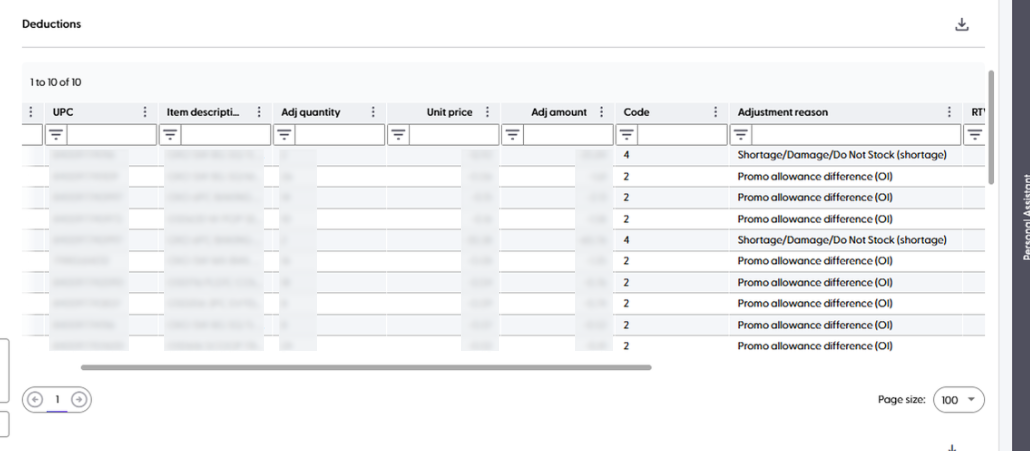
Figure 3.
Code 5: EDI Non-Compliance
Codes in this category: EC (EDI Non-Compliance), WV (Wrong Vendor), MR (Medturn Returns)
What it means: Kroger's system did not receive the invoice or item data due to technical errors, misrouted data, or system mismatches.
Example cases:
-
AUTO-DM-INV12345: An EDI 810 invoice failed due to a formatting error and was rejected
-
mpd09019538: Return handled under Medturn but not properly linked, generating an "item not received" claim
Resolution tip: Verify that all EDI documents (810, 856) are transmitted successfully. Monitor functional acknowledgments and keep backup formats ready for Lavante resubmission.
Further Read: EDI in Supply Chain: Boosting Efficiency, Accuracy, and Savings.
Code 6: Item Invoiced/Not Received (Shortage)
What it means: Kroger applied this deduction because the quantity invoiced by the supplier was higher than the quantity its distribution center recorded as received.
Example cases:
Code 6: A supplier invoiced 500 units, but Kroger's receiving records showed only 480 units delivered, resulting in a shortage deduction.
Resolution tip: Compare the purchase order, ASN, proof of delivery, and receiving records to confirm the actual delivered quantity. If the shipment was complete, submit signed delivery documentation along with supporting evidence when filing the dispute.
Further Read: How to Upload Proof of Delivery for Deduction Disputes
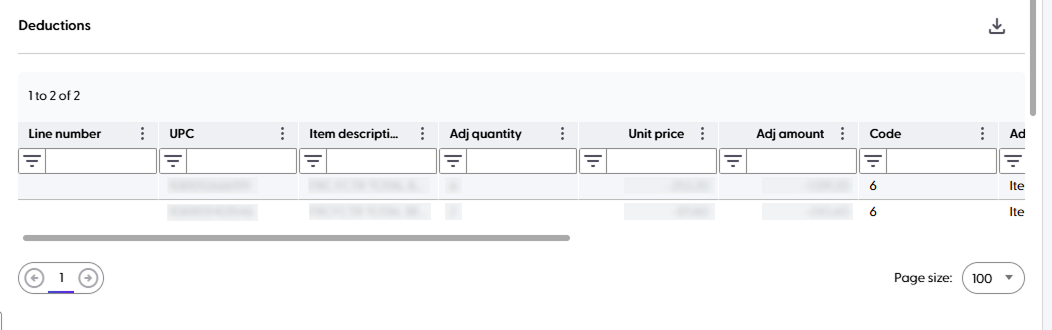
Figure 4.
Code 7: Overage (PCM)
What it means: Kroger found that more inventory arrived than was invoiced or expected and applied an adjustment to account for the overage.
Example cases
Code 7: Kroger's warehouse recorded 110 cases received, while the supplier invoice reflected only 100 cases, creating an overage adjustment.
Resolution tip: Review shipment records, warehouse receiving reports, and inventory reconciliation documents to determine whether the overage stemmed from a shipping, receiving, or invoicing error.
Further Read: EDI in Supply Chain: Boosting Efficiency, Accuracy, and Savings
Code 8: Net Dollar Difference
Codes in this category: CD (Cash Discount), LC (List Cost), SP (Stop Payment)
What it means: Unexpected cash discounts or pricing changes that reduce the total payable invoice amount. Often used when Kroger cannot automatically determine the cause of a discrepancy.
Example cases:
-
A $10,000 invoice was reduced to $9,800 due to a 2% early payment discount not factored into the supplier's expectation
-
Pricing mismatch on the invoice versus agreed list cost
Resolution tip: Ensure early payment terms and discount structures are clear in both billing and AR systems. Reconcile against PO agreements, and dispute misapplied terms through Lavante.
Code 9: Pickup Allowance
What it means: A freight-related deduction is applied when Kroger's carrier picks up the purchase order. The deduction covers the freight portion that Kroger absorbs on the supplier's behalf.
Resolution tip: Validate the freight allowance against the negotiated agreement. Disputes require carrier confirmations and the original freight terms in the supplier contract.
Code LC: List Cost Deduction
What it means: Kroger deducted the invoice because the product was billed above the approved list cost on file in its purchasing system.
Example cases:
Code LC: A supplier invoiced an item at $15.50 per unit, while Kroger's approved list cost was $15.00, resulting in a list cost deduction.
Resolution tip: Confirm that current cost agreements are updated in Kroger's system before invoicing. Keep approved pricing documentation on hand to dispute incorrect list cost deductions.
Further Read: How to Prevent Invoice Disputes: A Guide for Businesses
Code SD: Shorted Deals (Gross Invoice)
What it means: Kroger applied this deduction because promotional allowances, deal quantities, or agreed discount terms were not reflected correctly on the gross invoice.
Example cases:
Code SD: A promotional agreement covered 1,000 units, but the supplier billed the full invoice amount without applying the negotiated deal discount, resulting in a deduction.
Resolution tip: Review promotional agreements, deal sheets, invoices, and purchase orders to confirm all negotiated discounts and allowances are applied correctly before invoicing.
Further Read: Trade Promotion Management: A Complete Guide for CPG Brands
Code SH: Shortage Deduction
What it means: Kroger determined that fewer products arrived than were invoiced and deducted payment for the missing quantity.
Example cases:
Code SH: A shipment contained 300 cases, but Kroger's receiving records confirmed only 290, resulting in a shortage deduction.
Resolution tip: Validate delivery quantities using signed proof of delivery, carrier documentation, and warehouse receiving records before filing a dispute.
Code SH-tbd: Shortage Deduction (Pending Review)
What it means: Kroger placed a temporary shortage deduction on the invoice while a receiving discrepancy is under review or awaiting additional supporting documentation.
Example cases:
Code SH-tbd: Kroger applied a temporary deduction after flagging a receiving discrepancy and marked the claim as pending further investigation.
Resolution tip: Respond promptly with proof of delivery, shipment records, and receiving documentation so Kroger can complete its review and resolve the temporary deduction.
Further Read: Deduction Resolution: Everything You Need To Know
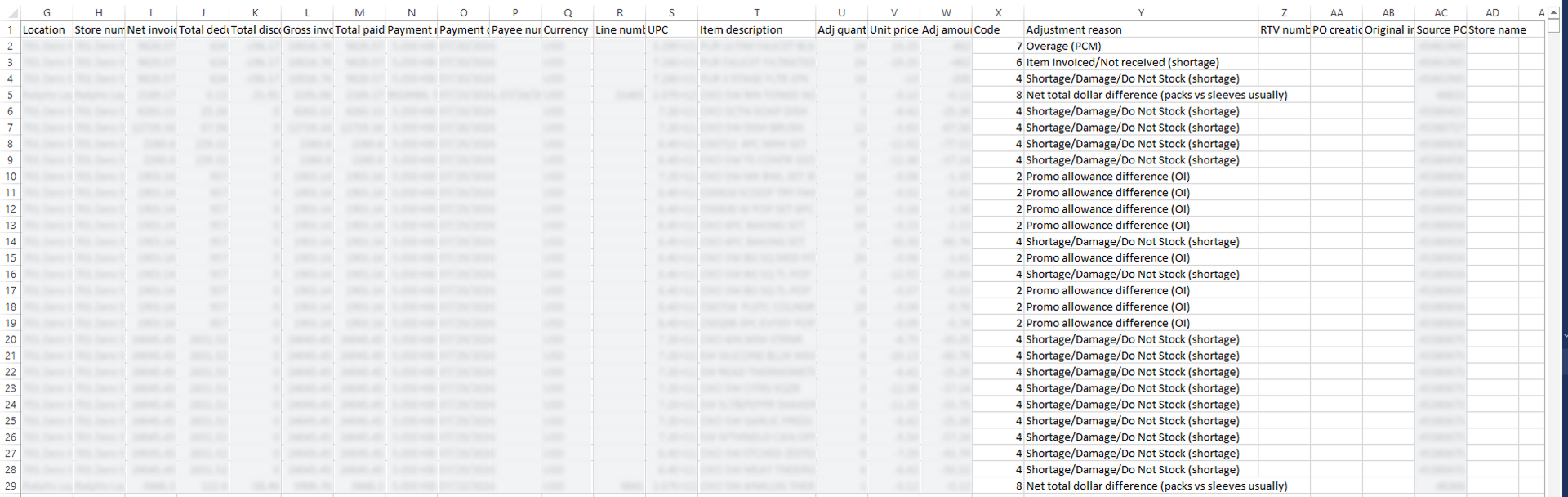 Figure 5.
ORAD Compliance and Late Ship Deductions
ORAD stands for Original Requested Arrival Date, which is the delivery date listed on the Kroger purchase order. ORAD compliance is Kroger's equivalent of Walmart's OTIF program, and missed ORAD dates trigger separate deduction codes.
Kroger expects suppliers to maintain at least:
- 98 percent on-time delivery rate against the ORAD
- 95 percent case fill rate on every shipment
Late shipments and case fill deductions appear in Lavante under ###-G claim formats. When disputing an ORAD-related deduction, a signed Proof of Delivery showing actual arrival time at the Kroger DC is the primary evidence required.
Learn More: Retail Compliance: Meeting Retailer Standards to Avoid Chargebacks
How to Decode Kroger Invoice Prefixes and Suffixes
Kroger appends prefixes and suffixes to invoice numbers that identify the deduction type and where to send the dispute. This decoder table covers the most common formats suppliers encounter.
Use Side Scroll by Holding Shift + Mouse Wheel
| Invoice Format | Example | Deduction Type | Where to Dispute |
|---|---|---|---|
| DMCx- | Cost-related debit memo | Kroger Fulfillment & Warehouse | Lavante Portal |
| DMQx | Quantity-related debit memo | Kroger Fulfillment & Warehouse | Lavante Portal |
| DMQAUTH | Return to Vendor billing | Kroger Fulfillment & Warehouse | Lavante Portal |
| DEALxxxxxx-DATE-xxxxxx | KATS scan-down promotional billing | Promotional Allowances | Lavante Portal |
| ########CB | Packaging and tech charges | Corporate Brand Suppliers | CorporateBrandsAccounting@kroger.com |
| 100######### | General billing, non-promotional | Payment corrections | Lavante (backup) |
| ddd-A**** | 706-A1245-012565 | Promotional Allowances | Lavante |
| 092-A | 092-A1245-01256 | KOMPASS Deductions | partnerportal@kroger.com |
| 060-C**** | 060-CB272 / 060-C004188-706 | Electronic Coupons | Lavante |
| RC####### | RC558408 | Coupon | shannon.reeder@inmar.com |
| C####### | C558408 | Coupon | shannon.reeder@inmar.com |
| 200############ | 10000000001228 | View on Lavante | kashcoupons@kroger.com |
| 5########_###### | 576107867_781602 | NCH Coupon | kashcoupons@kroger.com |
| 092-S##### | 092-S77765 | Slotting Contract | Lavante |
| ddd-H#### | 615-H1234 | Post Audit (Cotiviti/Connolly) | krogercorrespondence@cotiviti.com |
| ddd-R######### | 016-RU12345678 | Post Audit (PRGX) | kroger.east@prgx.com |
| ddd-V######### | 011-V123456789 | Reclamation or Returns | kroger.reclaim@prgx.com |
| ddd-V#### | 025-V1234 | Internal Post Audit | kroger.reclaim@prgx.com |
| mpd######## | mpd09019538 | Medturn Pharmaceutical / RX Returns | Lavante Portal |
| DDD-PS-###### | 181-PS-049273 | Returns Billing | rascwhseinvcontrol@kroger.com |
| ddd-F#### | 029-F1234 | Form 40 Returns | rascstoreinventory@kroger.com |
| 092-RE000000XXX | 092-RE000000509 | Recalls | RASCStoreInventory@kroger.com |
| 701-5###### | 701-5###### | Fred Meyer Non-Food Buyer Deductions | Lavante Portal |
| RCX#####-###### | RCX12333-125365 | Reclamation or Returns | Lavante Portal |
| 701-######## | 701-87238536 | Warehouse Returns | Lavante Portal |
| ###-NCF-####### | 701-NCF-0024548 | FM Food & Non-Food Compliance | Lavante Portal |
| DDD######### | ORAD Late Fees & Case Fill | Late Ship Compliance | Lavante Portal |
| DDD-FT-###### | 181-FT-149653 | Peyton Freight | Lavante Portal |
| AUTO-Memo | AUTO-CM or AUTO-DM | Manufacturing Invoice Deduction | Lavante Portal |
| Invoice ending in -CM or -DM | INV12345-CM | Warehouse & DSD Adjustment | Lavante (review original first) |
What You Can and Cannot Dispute Through Lavante
Lavante does not accept every claim type. Submitting the wrong request results in automatic closure, which wastes time and risks pushing the claim outside the 180-day dispute window.
Accepted on the Lavante Platform
The following claim and backup types can be submitted through Lavante:
-
Peyton and Warehouse Payables with 5-digit POs (claims and deduction backups)
-
Unpaid invoices for Peyton and Warehouse POs
-
ORAD Late Ship and Case Fill invoices in ###-G format
-
FT Peyton Freight Claims
-
All other ###-G backup requests
-
###-A invoices
-
060-C codes (electronic coupons)
-
701 Series claims, including 701-54#######, 701-84#######, 701-94#######
-
701-NC non-compliance invoices
-
Fred Meyer Non-Food 8-digit POs (unpaid invoices and deduction disputes)
-
DSD Payables for non-PO shipments
-
Manufacturing Plant Payables (non-COUPA)
If you previously emailed any of these claim types to addresses like Peytonpayables@kroger.com, RAScpromo@kroger.com, or Fmnondsdpayables@kroger.com They must now be submitted directly through Lavante.
Not Accepted on Lavante (Submit Elsewhere)
These claim types must go to specific contacts. Submitting them through Lavante results in automatic closure.
| Claim Type / Invoice Format | Where to Send |
|---|---|
| E-Commerce / Vitacost POs (6 or 9-digit) | VCApinvoice@kroger.com |
| ###-H Invoices | kroger.east@prgx.com |
| ###-V Invoices | kroger.reclaim@prgx.com |
| Freight Carrier Payables | rasecmfreight@kroger.com |
| iTrade / WESCO Payables | rasecitrade@kroger.com |
| Expense Payables | rasecexpense@kroger.com |
| Real Estate / Rental Payables | Local Kroger real estate team |
| Remittance Address Changes | Supplier Hub |
| EFT / Banking Info Changes | scsup@s.kroger.com |
How to Dispute a Kroger Deduction in Lavante
A successful Kroger dispute follows a consistent five-step process:
-
Identify the deduction: Log in to Lavante and locate the payment number ending in "CM." Each "CM" payment group has the deductions applied against a specific invoice
-
Decode the invoice format: Use the decoder table above to identify the deduction type and confirm whether Lavante is the correct dispute path
-
Gather backup documentation: Pull signed PODs, BOLs, EDI confirmations, promotional execution records, shipping photos, and any contract terms relevant to the deduction
-
Submit the dispute in Lavante: Select the correct claim category, attach all documentation, and confirm accuracy. Remember that no changes are allowed once filed
-
Track the response: PRGX reviews the dispute, and either approves the recovery or requests additional information. Monitor open disputes inside the 180-day window
Common reasons Kroger disputes fail include missing PODs, incorrect claim categorization, submitting the wrong invoice format through Lavante, and missing the 180-day window.
Recover Kroger Deductions Faster with iNymbus
Kroger's deduction system is one of the most complex in retail. Every code maps to a different invoice format, a different documentation requirement, and sometimes a different dispute channel entirely. Managing this manually across Lavante, PRGX, the Partner Portal, and a dozen email contacts is where most AR teams hit the wall.
iNymbus automates the full Kroger deduction process. The platform connects directly to Lavante, PRGX, and Partner Portal, identifies deduction codes automatically, pulls the right backup documentation (PODs, BOLs, EDI confirmations, invoices), and files disputes through the correct channel based on the invoice format and deduction type.
What suppliers using iNymbus get:
-
Kroger deductions are disputed up to 30 times faster than manual processes
-
Automatic routing across Lavante, PRGX, and direct email channels based on invoice prefix
-
Auto-fetching of PODs, BOLs, and EDI documents matched to specific claims
-
Centralized visibility across all open, in-progress, and resolved Kroger claims
-
Analytics that surface root causes by code, banner, and DC
iNymbus supports 52+ retailers and carriers, so the same automation that recovers Kroger deductions also handles Walmart OTIF, Amazon Vendor Central, Target SPM, and Costco compliance chargebacks.
Schedule a free demo with iNymbus or request a free deduction audit to see how much recoverable Kroger revenue is sitting in your current process.
Frequently Asked Questions About Kroger Deductions
How long do suppliers have to dispute Kroger deductions?
Kroger gives suppliers 180 days from the deduction date to file a dispute. Once a dispute is filed, no changes are allowed, so all documentation must be accurate at submission.
What is the Lavante portal?
Lavante is the third-party portal that hosts Kroger deductions and disputes. It is operated by PRGX on Kroger's behalf, which means when suppliers file disputes through Lavante, they are reviewed by PRGX, not by a Kroger buyer.
What does ORAD mean?
ORAD stands for Original Requested Arrival Date, which is the delivery date on a Kroger purchase order. Kroger expects suppliers to maintain at least 98 percent ORAD compliance and 95 percent case fill rate. Late ship and short ship deductions appear under ###-G formats.
How do I find Kroger deductions in Lavante?
Log in to Lavante and filter payments by those ending in "CM." Each "CM" payment groups the deductions applied against a specific supplier invoice.
What is the difference between DMC and DMQ debit memos?
DMC is a Debit Memo Cost, applied when there is a cost-related discrepancy. DMQ is a Debit Memo Quantity, applied when there is a quantity-related discrepancy. Both originate from Kroger's Fulfillment and Modernized Warehouse Systems and are disputed through Lavante.
Can I dispute post-audit deductions through Lavante?
No. Post-audit deductions in the ###-H or ###-V format must be sent to kroger.east@prgx.com or kroger.reclaim@prgx.com directly. Submitting them through Lavante results in automatic closure.
Why was my Kroger deduction dispute rejected?
The most common rejection reasons are missing Proof of Delivery, missing EDI acknowledgments, incorrect invoice format submitted to Lavante, dispute filed outside the 180-day window, or insufficient documentation supporting the claim.